


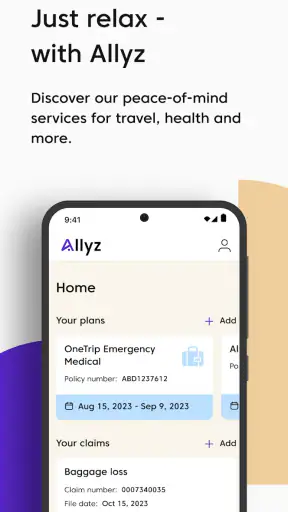
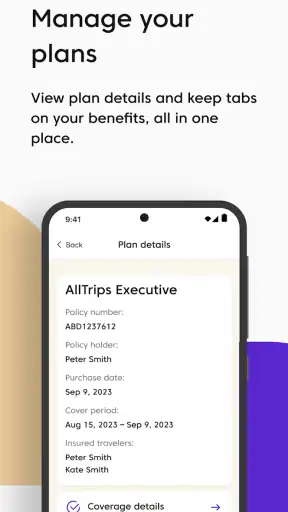
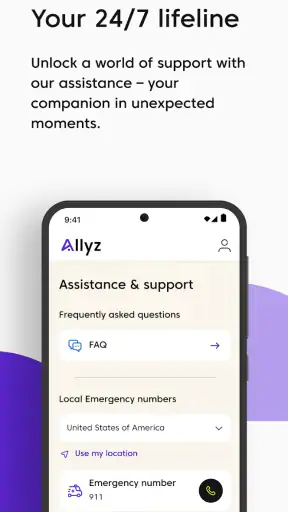
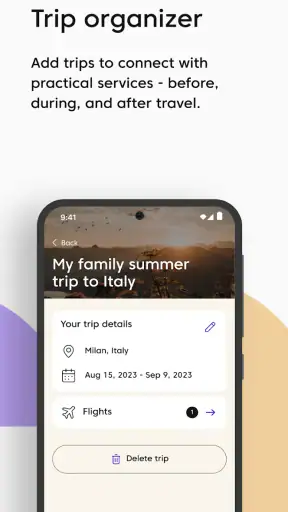
Travel apps often promise to make a trip feel simpler, but many end up becoming another folder of links on your phone. I found Allyz® more useful when I treated it as a travel companion for the moments around a journey: preparing before departure, keeping important assistance information close, and knowing where to look when plans become stressful. It is a free Travel & Local app from Allianz Global Assistance USA, and its approachable design makes it suitable for a first-time user who wants practical support without learning a complicated system.
The strongest reason to try it is not that it replaces every travel tool. It does not. Maps, airline apps, hotel apps, translation tools, and a secure document wallet still have their own jobs. The value here is having travel-related help gathered in one place instead of searching through email, browser tabs, and screenshots when you are already tired or worried. My advice is to set it up before the trip, not while standing in an airport queue.
What to expect when you open Allyz®
Allyz® feels aimed at ordinary travelers rather than frequent flyers who want a dense dashboard of advanced controls. The app belongs to the Travel & Local category, and that is a good description of its role: it is connected to the travel experience, but it is not a full itinerary planner or a replacement for every service you use on the road.
That distinction matters during installation. If you expect it to build an entire vacation from a destination and a few dates, you may find the experience narrower than expected. If you want a central place to begin handling travel assistance and related information, its purpose becomes clearer. I would think of it as a support layer that sits alongside the booking and navigation apps already on your phone.
The app has been available since February 22, 2013, and the current version is 6.6.0. It supports Android 7.0 and later, which makes it accessible on many older devices as well as newer phones. It is rated for Everyone, so the presentation is not built around adult-only material or a specialist audience. That makes it a reasonable choice for a family member who is not especially comfortable with technology.
Its reception is also encouraging: the app holds a 4.7 average from around 6,300 ratings, with about 1,000 written reviews. More than 1 million people have installed it. Those figures do not guarantee that every traveler will like the workflow, but they suggest that the basic idea has worked for a substantial audience.
One practical expectation is worth setting early: an app like this is most valuable before an issue happens. When a flight is delayed, a bag is missing, or you are trying to understand what help is available, the worst time to discover an unfamiliar menu is the moment you need it. I spent more time exploring the app calmly than I would have preferred, but that small investment made the later steps feel less intimidating.
Who will get the most from it
I would recommend it first to people who travel occasionally and do not have a carefully organized travel system. It is also useful for anyone who wants assistance details available on a phone rather than buried in a confirmation email. Families can benefit from preparing it on the device that will actually travel with them, while older travelers may appreciate a dedicated place to look instead of relying on a younger relative to find information remotely.
It is less compelling for someone who already has a polished workflow built around an insurer’s customer portal, a corporate travel platform, and a separate document-management app. In that situation, Allyz® may overlap with tools you already know. I would also skip it if you are looking only for live flight tracking, detailed sightseeing recommendations, or a complete booking engine. Those are different problems, and a flight or destination specialist will usually be better at them.
First setup: make the app useful before you need it
After installing the app, my first recommendation is to avoid rushing through the opening screens. Read each prompt and notice what the app is asking you to provide or confirm. Travel tools can feel unhelpful when the user gives them no context, so the setup stage is where you turn a general travel companion into something relevant to your situation.
Have your travel information nearby before you begin. That might mean keeping a confirmation email open on another device or writing down the details you are likely to need. I found this more efficient than switching repeatedly between apps while trying to remember a reference number. It also reduces the chance of entering a detail incorrectly because you are working from memory.
A useful habit is to complete the setup while your connection is stable and you are not distracted. Do it at home, at a desk, and then close and reopen the app once you are done. That simple check gives you a chance to see whether the information you entered is easy to find again. If you cannot locate it during a quiet test, you will not magically find it faster in a crowded terminal.
Privacy-conscious users should take the same approach they would with any travel or assistance app: review each permission and account prompt rather than accepting everything automatically. I do not see a reason to provide information that is unrelated to the task I am trying to complete. A little selectiveness at setup keeps the app focused and makes it easier to understand what role it plays on your phone.
There is also a device choice that people often overlook. If you are traveling with a partner, decide whose phone is the primary one. Installing the app on both devices can be sensible for a couple or family, but only if everyone knows which copy contains the most current information. Otherwise, an update made on one phone may be forgotten on the other. For a solo traveler, the better choice is the phone that will remain charged and accessible during the journey.
A small preparation workflow that saves time later
I suggest creating a short pre-trip routine around the app. Open it after your main bookings are finished, confirm that the relevant travel details are present, and take a moment to identify the route back to assistance or support information. Do not rely on remembering the exact button label weeks later. Instead, make the navigation familiar enough that you can reach the useful screen with minimal thought.
Then test the app under realistic conditions. Turn down your attention rather than your brightness: imagine that you are carrying a bag, waiting in a noisy area, and trying to help a tired companion. If the screen or wording feels unclear in that situation, note what you need to prepare in advance. This is one of the app’s less obvious strengths: it encourages you to think about access before a disruption turns into an emergency.
I would not use it as the only place for every critical document. Keep essential identification and booking records in the original channels as well, and follow any instructions associated with your travel arrangements. Allyz® can make information easier to reach, but redundancy is sensible when you are crossing borders or dealing with a time-sensitive problem.
Your first meaningful success: finding help without guesswork
The first successful action should be simple and practical: use the app to locate the travel assistance information you would need in a mildly stressful situation. This is a better test than merely opening the home screen. If you can move from the starting point to the relevant support area without confusion, you have confirmed that the app is ready to serve its main purpose for you.
Try this before leaving home. Imagine that your plans have changed and you need to know what assistance is available. Open Allyz®, follow the most obvious route, and read the information slowly. Pay attention to whether you understand what to do next, not just whether you can reach the page. A useful travel app should reduce uncertainty, and this exercise shows whether it does that for your particular needs.
One realistic scenario is a delayed journey after a long connection. You are sitting near the gate, your battery is not full, and you cannot remember whether the relevant information is in a booking email or an insurance document. Instead of searching through every message, you open the app and start from the travel-support area you already practiced. Even if the app cannot resolve the entire disruption itself, it can shorten the first part of the search, which is often where frustration builds.
Another scenario involves helping someone else. A parent or partner may be anxious and ask what to do next, while you are holding their documents and trying to keep the group moving. If the app has been prepared on the device you are carrying, you can consult the information without asking that person to unlock their email or remember a policy detail. That is a modest benefit, but it is exactly the kind of benefit that becomes meaningful outside the home.
My advanced tip is to treat the first successful action as a rehearsal, not a one-time check. Revisit the relevant area after making a major change to your trip. Travel details can evolve, and an app is only helpful when the information inside it still matches the journey you are taking. A quick review before departure is more reliable than assuming that the first setup remains correct forever.
What Allyz® does better than the usual alternatives
The usual alternative is a scattered collection of browser pages, insurer messages, airline notifications, and saved screenshots. That arrangement can work, but it depends heavily on your own organization. Allyz® offers a more deliberate starting point for travel assistance, which is helpful when you do not want to remember which company sent which email.
Compared with a general notes app, it gives the information a travel-specific context instead of leaving you with a blank page and the responsibility to design your own system. Compared with an airline app, it is not tied to the narrow task of managing one carrier’s flight. Compared with a map app, it is not primarily about directions. The trade-off is that it will not have the depth of those specialized tools in their own areas.
That trade-off is important. I would not open Allyz® to find the fastest route across a city, compare hotel rooms, or manage every boarding pass. I would open it when the question is about travel support and I want a focused place to begin. Knowing that boundary prevents disappointment and makes the app feel more useful.
Common confusion and the friction to expect
The biggest possible confusion is assuming that “travel companion” means “complete travel organizer.” It does not replace the practical apps you use to book, navigate, translate, communicate, or monitor a specific reservation. Its strength is narrower, and the experience improves once you accept that it is a support-oriented companion rather than a universal travel command center.
Another point of friction is preparation. An app that helps during a problem still needs to be understood before the problem happens. Users who install it at the airport may conclude that it is inconvenient simply because they are trying to learn and act at the same time. I consider that a workflow limitation rather than a reason to dismiss it, but it is worth being honest about: the app rewards advance setup.
There is also a human limitation that no interface can remove. Travel assistance information may tell you where to start, but you may still need to communicate with a provider, explain your situation, or follow additional instructions. Do not interpret a convenient screen as a guarantee that every disruption will be solved instantly. The app can organize the first step; it cannot make a delayed flight, lost item, or unexpected event disappear.
People with older phones should note the Android requirement. Devices running Android 7.0 or later are supported, but anyone using an older system will need to check compatibility before planning around the app. On a supported phone, I would still keep the operating system and the app current when possible, especially before traveling. A last-minute update at the terminal is an avoidable distraction.
iPhone users should approach the download in the same practical way: confirm that the app is available for their device and then perform the setup while connected to a dependable network. I would not wait until arriving abroad to discover that the installation or sign-in process needs attention. Preparing at home gives you time to choose another way to keep important information accessible if the app does not fit your workflow.
When another option is better
If your main concern is a live departure board, choose the airline or airport’s own tool. If you need turn-by-turn directions, use a dedicated navigation service. If your travel is managed by an employer, a corporate platform may be more authoritative for itinerary changes. And if you already have a trusted assistance portal that you check regularly, adding another app may create duplication rather than clarity.
Allyz® makes the most sense when the alternative is disorder: searching old messages, guessing which document matters, or asking someone else to find help while you are under pressure. It is not automatically better than a specialized tool. It is better when you need a travel-focused place to begin and do not already have one.
The next step: build it into your departure routine
Once the first test works, the next step is to make the app part of your departure routine without making it the whole routine. Check it alongside your booking confirmations, identification, payment method, and charging plan. Think of it as one layer in a small safety net, not as permission to stop carrying backup information.
I would also show a travel companion where to find the important area, especially if that person may need to use the phone while you are driving, resting, or dealing with a queue. This is a non-obvious but valuable preparation step. An app is more useful when another trusted person can navigate it without waiting for a lesson in the middle of a disruption.
Keep your expectations realistic after the trip begins. Use the app when its travel-assistance focus matches the question in front of you, and switch to the airline, hotel, map, or messaging app when the task belongs there. That division of labor keeps your phone less cluttered and avoids forcing one tool to perform a job it was not designed to handle.
For a free app, Allyz® offers a sensible reason to occupy a small place on a traveler’s phone. The Everyone age rating, broad Android compatibility, and strong user response make it approachable, while the backing of Allianz Global Assistance USA gives it a clear travel-support identity. I especially like it for occasional travelers who want reassurance without constructing a complicated system.
My final recommendation is straightforward: install it before your next journey, complete the setup calmly, and practice finding assistance information once. If that path feels clear, keep it as part of your travel preparation. If what you really need is booking control, navigation, or live transport updates, choose a specialist app instead. Allyz® is at its best when it turns a stressful search for travel help into a familiar first step.


